
User Management
Overview
Section titled “Overview”User management in ARROW is straightforward. Roles are broken into three categories:
- Admin: We recommend assigning this role only to practice leadership (e.g., Practice Director(s), Practice Manager(s), etc.).
- Manager: This role is ideal for Project Management staff or anyone responsible for adding clients or requesting devices. We do not recommend assigning individual contributors as managers to reduce the possibility of duplicate device requests.
- User: This role is suited for team members who will utilize ARROW in a technical delivery capacity. They will maintain administrative rights over physical devices and virtual deployments but will not have access to billing information, invoices, device requests, etc.
Permission Hierarchy Summary
Section titled “Permission Hierarchy Summary”The table below provides a brief overview of ARROW’s role-based access control (RBAC) structure.
| Capability | Admin | Manager | User |
|---|---|---|---|
| User Management | ✅ Full | ❌ None | ❌ None |
| Role Management | ✅ Full | ❌ None | ❌ None |
| Client Creation | ✅ Yes | ✅ Yes | ❌ Read-only |
| Client Management | ✅ Yes | ✅ Yes | ❌ Read-only |
| Device Request Creation | ✅ Yes | ✅ Yes | ❌ Read-only |
| Device Access | ✅ All | ✅ All | ✅ All |
Adding Users to ARROW
Section titled “Adding Users to ARROW”To add users in ARROW, click Users in the sidebar, then click the + Add User button.
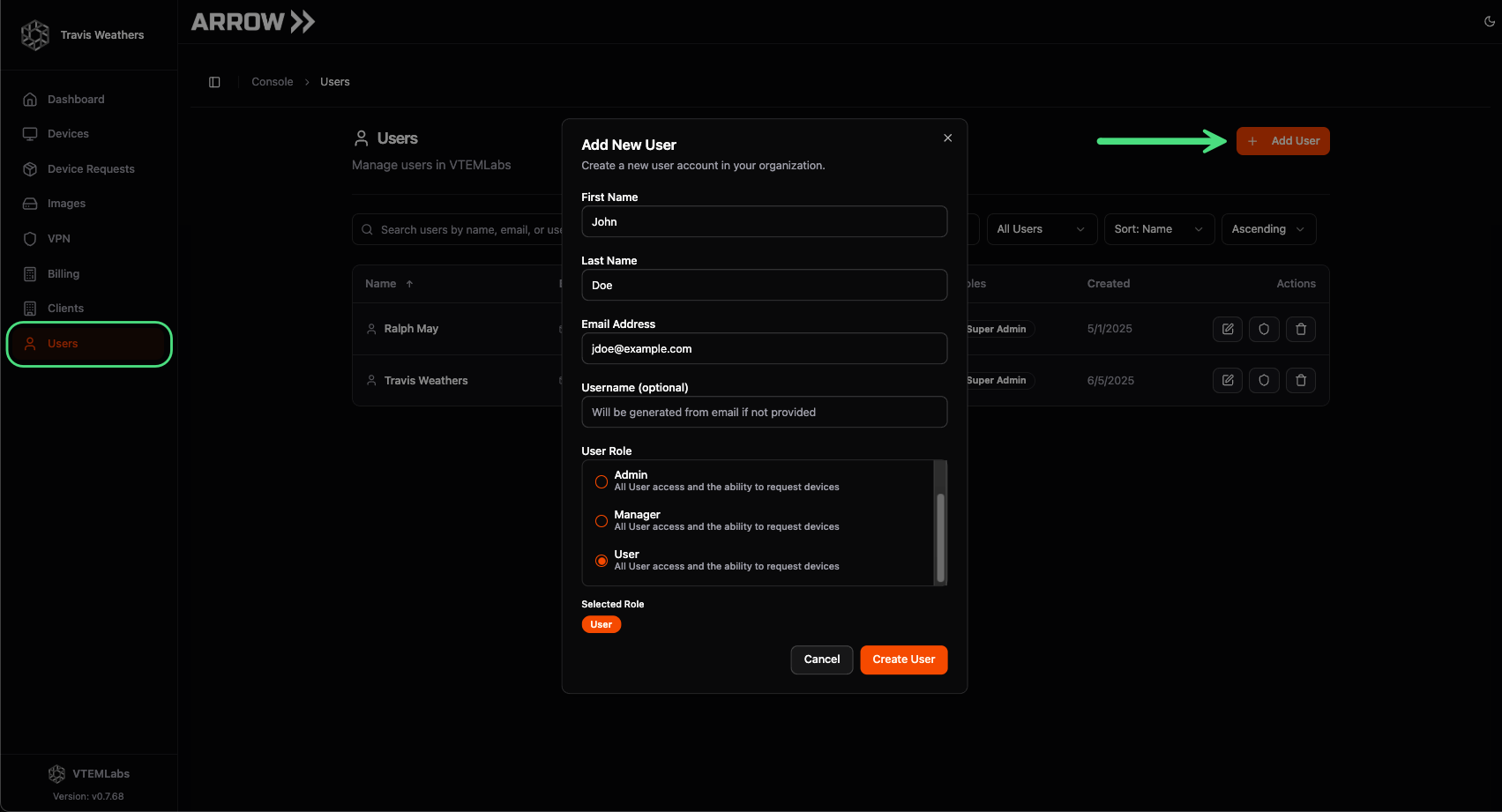 Adding a user to ARROW
Removing Users from ARROW
Section titled “Removing Users from ARROW”You can immediately kill access to any user in ARROW and your VPN by terminating their account within your IDP (e.g., Google, o365, Okta, etc.). However, you will still need to delete their account from the ARROW portal. To do this, click Users in the sidebar, then click the Trash Can button in the table next to the desired user.
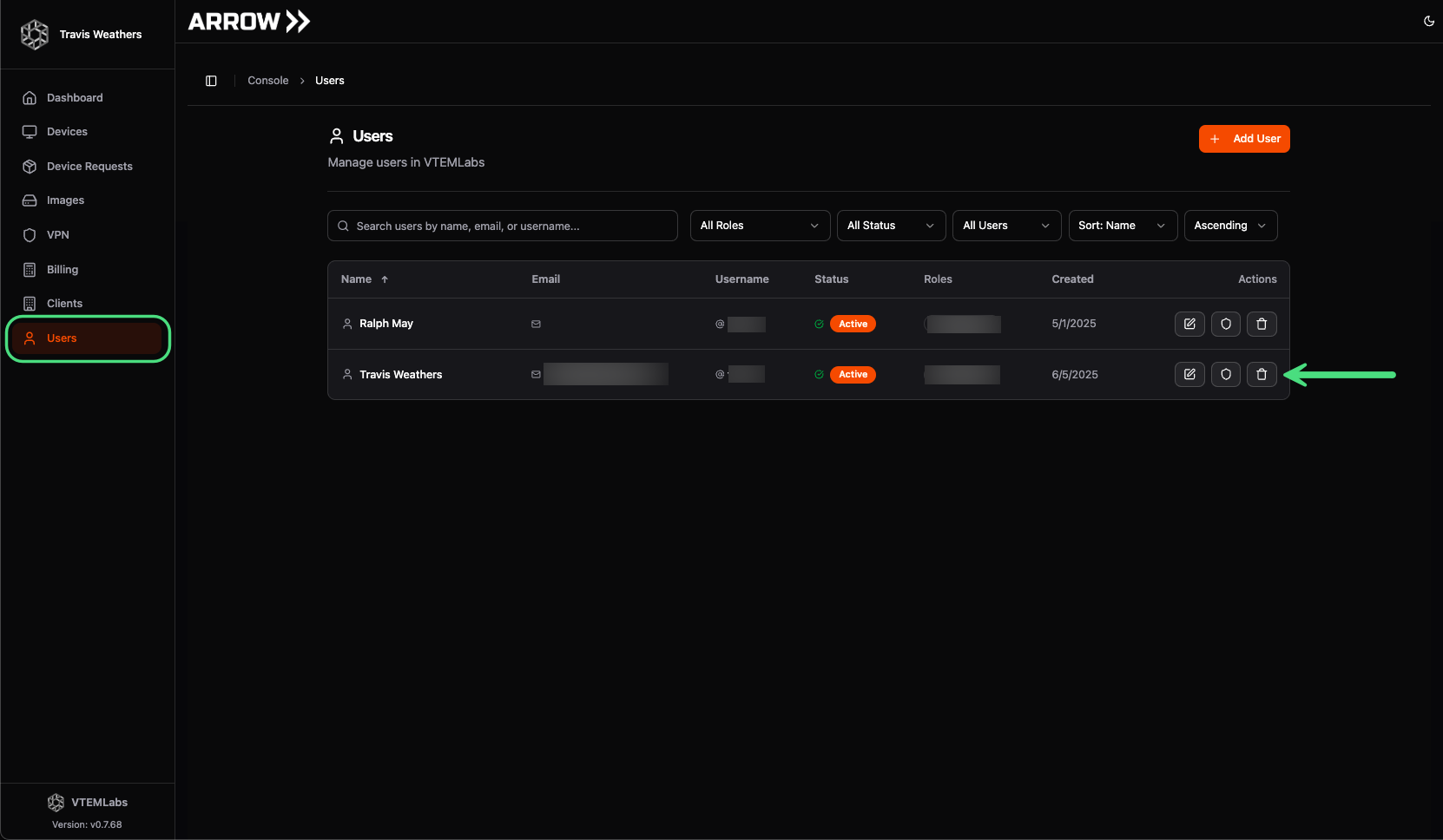 Removing a user from ARROW
Technical Implementation
Section titled “Technical Implementation”This section provides technical details about ARROW’s permission system architecture for developers and system administrators.
Permission System Architecture
Section titled “Permission System Architecture”ARROW implements a sophisticated multi-layered RBAC system using PocketBase collections and hooks. The architecture consists of the following components:
Core Collections
Section titled “Core Collections”| Collection | Purpose |
|---|---|
users | User accounts with aggregated permissions field |
roles | Role definitions with organization_use flag |
user_roles | Junction table linking users to roles |
permissions | Granular capability definitions |
Three-Tier Role System
Section titled “Three-Tier Role System”The role system provides hierarchical access control:
| Role | Scope | Primary Capabilities |
|---|---|---|
| Admin | Full organization control | User management, role assignment, billing access, all operations |
| Manager | Operational control | Client creation, device requests, client management |
| User | Technical delivery | Device access, VPN connectivity, read-only to administrative functions |
RBAC System Architecture
Section titled “RBAC System Architecture”graph TD
A[User] -->|has many| B[User Roles]
B -->|references| C[Role]
C -->|has many| D[Role Permissions]
D -->|references| E[Permission]
A -->|aggregated| F[User Permissions Array]
C -->|organization_use flag| G{Assignable by Org?}
G -->|Yes| H[Org Admins Can Assign]
G -->|No| I[System Only]
J[Hooks] -->|Sync on Role Change| F
J -->|Validate on Assignment| G
J -->|Sync to Zitadel| K[Zitadel Projects]
J -->|Sync to NetBird| L[VPN Access Groups]
Permission Synchronization
Section titled “Permission Synchronization”Permissions are automatically synchronized from roles to users through PocketBase hooks implemented in backend/hooks/user_permissions.go.
SyncUserPermissions Function
Section titled “SyncUserPermissions Function”The SyncUserPermissions function (lines 230-349) aggregates permissions from all assigned roles:
- Queries user_roles - Retrieves all role assignments for the user
- Expands role permissions - Loads the permissions array from each role
- Deduplicates - Combines unique permissions from all roles
- Updates user record - Stores the aggregated permissions on the user
Sync Triggers
Section titled “Sync Triggers”Permission synchronization is automatically triggered on:
| Event | Trigger Location |
|---|---|
| User role assignment | user_roles create hook |
| User role removal | user_roles delete hook |
| Role update | roles update hook (syncs all affected users) |
| Role deletion | roles delete hook (syncs all affected users) |
Delayed Sync After User Creation
Section titled “Delayed Sync After User Creation”When a new user is created, permission sync is delayed by 500ms to allow Zitadel integration to complete first:
go func() { time.Sleep(500 * time.Millisecond) SyncUserPermissions(app, userId)}()Manual Sync Endpoint
Section titled “Manual Sync Endpoint”For debugging purposes, administrators can manually trigger permission sync:
POST /api/admin/sync-user-permissionsRole Validation
Section titled “Role Validation”Role assignment validation is enforced in backend/hooks/user_roles_validation.go to ensure organization admins can only assign appropriate roles.
organization_use Flag
Section titled “organization_use Flag”Each role has an organization_use boolean field:
| Flag Value | Meaning |
|---|---|
true | Role can be assigned by organization admins |
false | System-only role (site admin assignment only) |
Validation Rules
Section titled “Validation Rules”When a user role assignment is created or updated:
- Check assigner permissions - Verify the requesting user has permission to assign roles
- Validate organization_use - If assigner is not a site admin, verify the role has
organization_use: true - Reject invalid assignments - Return error for unauthorized role assignments
Error Handling
Section titled “Error Handling”Attempting to assign a system-only role without site admin privileges returns:
{ "error": "This role cannot be assigned by organization administrators"}VPN Access Control Integration
Section titled “VPN Access Control Integration”User permissions integrate with NetBird VPN access control to manage device connectivity.
Consultant Assignment
Section titled “Consultant Assignment”The consultants field on device requests controls VPN user access:
| Field | Type | Description |
|---|---|---|
consultants | Array | Users authorized to access the device via VPN |
Automatic VPN Group Synchronization
Section titled “Automatic VPN Group Synchronization”When consultants are assigned to devices, the system automatically synchronizes VPN access through hooks in backend/hooks/device_user_access.go:
- Detects consultant changes - Compares old and new consultant arrays
- Checks access control status - Verifies if device has access control enabled
- Updates NetBird groups - Adds/removes users from consultant groups
- Enforces one-way policies - Ensures consultants can reach devices but not vice versa
Access Control Levels
Section titled “Access Control Levels”| Level | Setting | Behavior |
|---|---|---|
| Organization | user_access_control_default | Default for all devices in org |
| Device | user_access_control | Per-device override (enabled/disabled/inherit) |
See Network Access Control for detailed documentation on VPN access control.
Detailed Permission Hierarchy
Section titled “Detailed Permission Hierarchy”ARROW defines granular permissions across multiple categories:
User Management Permissions
Section titled “User Management Permissions”| Permission | Description |
|---|---|
users.organization.create | Create users within the organization |
users.organization.delete | Remove users from the organization |
users.organization.update | Modify user details and role assignments |
users.organization.view | View user list and details |
Device Management Permissions
Section titled “Device Management Permissions”| Permission | Description |
|---|---|
devices.request.create | Submit new device requests |
devices.request.update | Modify existing device requests |
devices.manage | Full device management (settings, status, etc.) |
devices.view | View device information |
Infrastructure Management Permissions
Section titled “Infrastructure Management Permissions”| Permission | Description |
|---|---|
infrastructure.manage | Manage virtual infrastructure |
infrastructure.view | View infrastructure resources |
Client Management Permissions
Section titled “Client Management Permissions”| Permission | Description |
|---|---|
clients.create | Create new client records |
clients.manage | Full client management |
clients.view | View client information |
Billing Permissions
Section titled “Billing Permissions”| Permission | Description |
|---|---|
billing.view | Access billing information and invoices |
Permission Aggregation Rules
Section titled “Permission Aggregation Rules”Permissions follow additive aggregation:
- Union of all role permissions - User receives all permissions from all assigned roles
- No permission subtraction - Higher roles cannot remove permissions granted by other roles
- Cached on user record - Aggregated permissions stored in
users.permissionsarray for fast access
Implementation Reference
Section titled “Implementation Reference”Key Source Files
Section titled “Key Source Files”| File | Purpose |
|---|---|
backend/hooks/user_permissions.go | Permission sync logic (lines 230-349) |
backend/hooks/user_roles_validation.go | Role assignment validation |
backend/hooks/device_user_access.go | VPN access synchronization |
Related Collections
Section titled “Related Collections”| Collection | Key Fields |
|---|---|
users | permissions, organization, is_site_admin |
roles | name, permissions, organization_use |
user_roles | user, role |
permissions | name, description |